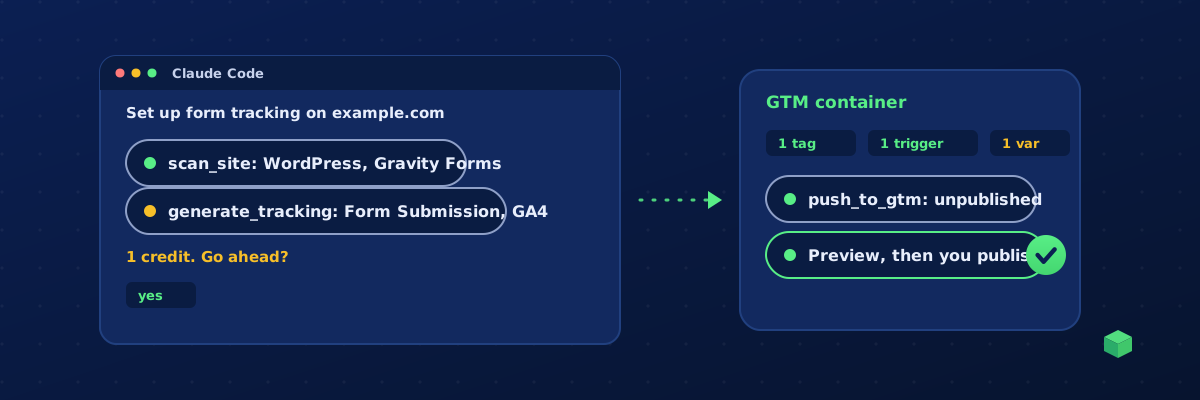
Yes, Claude can set up your website tracking, and it takes about fifteen minutes the first time. Connect Claude Code or Claude Desktop to TrackingCoder's MCP server, give Claude your URL, approve what it proposes, and let it push the result into your Google Tag Manager workspace. You test in Preview and publish. This guide walks through the setup, the prompts that work, what it costs, and the lines Claude cannot cross.
What Claude can and cannot do
The TC MCP server gives Claude ten tools. Three are free diagnostics, four are read-only, and three act on your account, each with an explicit confirmation where it matters:
- Read:
list_scenarios(every event, channel and price),get_credits(your balance),list_gtm_workspaces(the containers and workspaces your Google account can edit) andget_monitoring(live counts, traffic sources, goals and score for monitored sites). - Diagnose:
scan_site(platform, forms, pixels, e-commerce stack),detect_tracking(which pixels a site runs) andcheck_consent(what fires before consent). Free, rate limited. - Act:
generate_tracking, which produces the tags, triggers and variables for one event on one channel and is the only call that spends credits;push_to_gtm, which places a generation in your GTM workspace as unpublished changes; andexport_report, which produces a client report or a consent report as a 24-hour link.
Not available through Claude, by design: publishing a GTM version, buying credits, changing billing, creating or revoking keys, team and workspace changes, and the IDs in your vault. Those stay in the app where you can see what you are doing. Claude writes the configuration and places it; you review it and press Publish.
Before you start
- A TrackingCoder account on TC Pro, in a paid month. The 14-day trial unlocks everything else but not the API.
- Google Tag Manager installed on the site. If it is not, the GTM beginner's guide covers the one snippet you need.
- Your IDs: the GA4 measurement ID (G-…), and for ads the Google Ads conversion ID and label (AW-…), the Meta Pixel ID, the LinkedIn partner ID or the Microsoft UET tag ID.
- Claude Code installed, or Claude Desktop with Node.js available for the bridge.
Step 1: create an API key
Open Account, API keys, name the key after where it will live ("Claude Code on my laptop") and create it. The key starts with tc_live_ and is shown once. Copy it somewhere safe. A key acts as your account: same workspace, same credit pool, same limits. You can revoke it at any time, and anything using it stops immediately.
Step 2: connect Claude
Claude Code
One command registers the server for the current project (add --scope user to make it available everywhere):
claude mcp add --transport http trackingcoder https://trackingcoder.com/api/mcp --header "Authorization: Bearer tc_live_YOUR_KEY"Run claude mcp list to confirm it connected, then start a session. Type /mcp to see the six tools.
Claude Desktop
Claude Desktop reaches remote servers through the mcp-remote bridge. Add this to claude_desktop_config.json (Settings, Developer, Edit Config) and restart the app:
{
  "mcpServers": {
    "trackingcoder": {
      "command": "npx",
      "args": ["-y", "mcp-remote", "https://trackingcoder.com/api/mcp", "--header", "Authorization: Bearer tc_live_YOUR_KEY"]
    }
  }
}
Cursor and VS Code work too; the Cursor and VS Code guide has their config files.
Step 3: scan the site
Start plainly:
Scan https://example.com with TrackingCoder and tell me what you found.
Claude calls scan_site and comes back with the platform (say WordPress with Elementor), the form plugin, whether there is a cart or checkout, which pixels are already installed, and a scanId. The scanId is what generation uses, and it is valid for 24 hours. Scanning is free and the same URL within that window returns the cached profile.
Step 4: choose events and channels
What can I track on this site, and what does each event cost? I care about leads from the contact form and calls from the phone number.
Claude reads the catalog, matches it to what the scan found, and proposes something like: Form Submission on GA4 (1 credit, free-tier eligible), Phone Click on GA4 (1 credit), Form Submission on Google Ads (1 credit, needs the AW- ID and label). Ask for the GTM container format unless you have a reason to want a direct script; a container imports cleanly and keeps everything in one place.
If you run ads in the EU or UK, add Consent Mode v2 (1 extra credit per generation). The Consent Mode v2 guide explains why, and the free Consent Checker shows what your site does today.
Step 5: approve each generation
This is the step that costs money, so it is the step with a lock on it. Claude must tell you the scenario, the channel, the ID it will use and the credits it will spend, then wait. When you say yes, it calls generate_tracking with confirm: true. Without that flag the server refuses the call, so a runaway loop cannot drain a balance.
Yes, generate Form Submission for GA4 with G-ABC123XYZ, container format, and save the container JSON as form-submission-ga4.json.
The result includes the container JSON, the equivalent GTM Custom HTML snippet, a direct script, the event name and parameters, the credits charged, your new balance, and a generationId that the push uses. Identical requests within two minutes return the first result without a second charge, so a retry after a dropped connection is safe.
Step 6: push to your Google Tag Manager workspace
This is the step that turns a generated file into tags in your container. It needs Google connected to your TrackingCoder account once, which you do in the app (generate any event and click Add to Google Tag Manager; the connection uses the Tag Manager permission only and is verified by Google). After that, Claude can do it:
Push both to the Production workspace of GTM-ABC1234.
Claude looks the container up with list_gtm_workspaces, confirms the target with you, and calls push_to_gtm with confirm: true. The tags, triggers and variables land in the workspace as unpublished changes, exactly like the app's one-click push, and Claude gives you the link to the workspace. Nothing is live. Pushes are upserted by name, so repeating one is safe.
Prefer a file? Ask Claude to save the container JSON and import it in GTM: Admin, Import Container, choose the file and the workspace, Merge, Rename conflicting tags, triggers and variables. Never choose Overwrite; it replaces the whole container. If someone already did, restore it from version history.
Step 7: test in Preview, then publish
Open the workspace, open Preview, visit the site, submit the form once, click the phone number once. Each tag should fire exactly once. Then publish the version with a note. Five minutes here prevents the two expensive failures: a purchase that fires twice and inflates ad bidding, and a tag that never fires and starves it. The tracking health guide shows what to look for afterwards.
After launch: ask Claude how it is going
With TC Pro monitoring on the site, the same connection answers questions about live data: "How many form submissions did example.com get this week, and from which traffic sources?", "Which site had the fewest events today?", "Is the purchase goal on track?". Claude calls get_monitoring and answers from the counts, conversion rates, traffic sources and goals in your dashboard. For the monthly client deliverable, "Export the client report for example.com for last month as a PDF" calls export_report and returns a branded report link, valid 24 hours, that you can forward as is.
A full session, condensed
- You: Scan https://example.com and list what we can track for leads.
- Claude: WordPress, Gravity Forms on /contact, tel: links in the header, GA4 and GTM installed, no Meta Pixel. Suggested: Form Submission and Phone Click on GA4, 1 credit each. Balance: 10 credits.
- You: Do both for G-ABC123XYZ with Consent Mode v2.
- Claude: That is two generations at 2 credits each (1 plus Consent Mode), 4 credits total. Shall I go ahead?
- You: Yes.
- Claude: Done, balance 6 credits. Push them to Google Tag Manager, or save the container files?
- You: Push both to the Production workspace of GTM-ABC1234.
- Claude: Placed in Production as unpublished changes: 2 tags, 2 triggers, 3 variables, verified. Open Preview, test the form once, then Publish.
What it costs
| Action | Cost |
|---|---|
| Scan, tracking detection, consent check, catalog, balance | Free |
| Generate one event on one channel | Usually 1 credit (the catalog shows exceptions) |
| Each advanced parameter (previous page, scroll depth, element text) | +1 credit |
| Consent Mode v2 on every tag | +1 credit |
| TC Pro | Includes 10 credits a month and 15% off packs |
Credits come from the same pool as the wizard, so what Claude spends shows in your dashboard like any other generation. Nothing can be bought through Claude; when the pool is empty the call fails with a link to buy credits in the app.
Keeping it safe
- Keys are tied to a paying Pro subscription and checked on every call. If the subscription lapses the keys pause; they resume when it is paid again.
- Per key, per day: 100 scans, 40 consent checks, 50 generations, 30 GTM pushes, 20 report exports, and 60 calls a minute. Enough for real work, not enough for a mistake to be expensive.
- Pushes only ever create unpublished workspace changes. A version goes live only when a person presses Publish in GTM.
- Every tool call is logged on your account, so you can see what an assistant did and when.
- Do not paste the key into a prompt or a shared transcript; it belongs in the config. If a key leaks, revoke it and create another.
Where TrackingCoder fits
TrackingCoder is the tracking engine behind the conversation. It scans the site, knows how 450+ event and channel combinations should be wired, generates the exact tags, triggers and variables for your pages, places them in Google Tag Manager, and then watches them fire. Claude is the interface; the knowledge and the output are the same you get in the app. The API and MCP server are part of TC Pro; the app itself starts free with 5 credits a month. The MCP page has a short video tour.