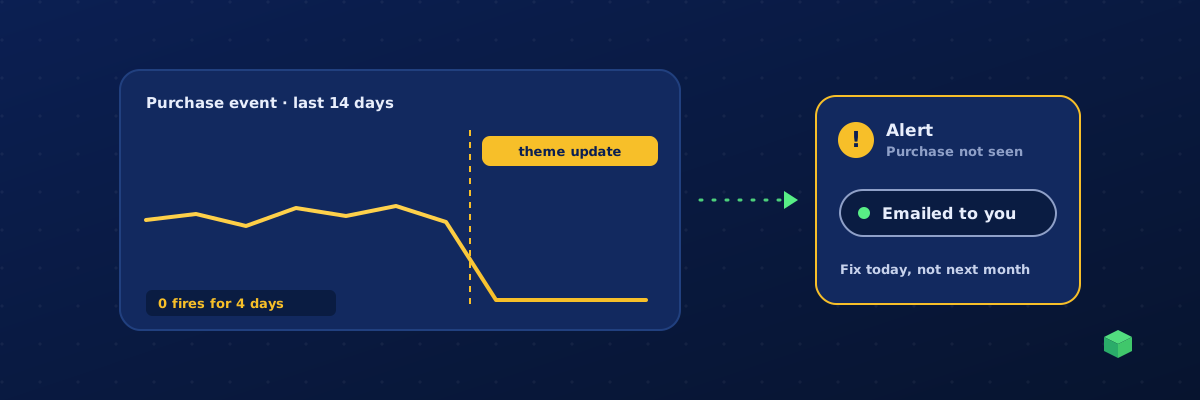
Broken tracking rarely announces itself. GA4 keeps showing page views, Google Ads keeps spending, and the only clue is a number that quietly makes less sense than it did last month. Here are the seven signs to look for, a ten-minute check you can run right now, the causes we see most, and how to be alerted next time instead of finding out at month end.
Seven signs your tracking is broken
- A conversion drops to zero overnight while traffic stays flat. Real behaviour changes gradually; tracking breaks on a deploy.
- Conversions double. Two purchase events per order, or a form submission that fires on page load, usually after a plugin update or a duplicated tag.
- Google Ads says "No recent conversions" or "Inactive" on a conversion action that used to record.
- Meta Events Manager shows no activity for an event that fired last week.
- GA4 Realtime shows nothing when you test it yourself. The most reliable sign, and the one nobody checks.
- Your ad platform's automated bidding gets worse without a change in budget or creative. It is optimising towards fewer or wrong signals.
- Revenue in GA4 disagrees wildly with your shop's own reports. Small gaps are normal; a 40 percent gap means purchase tracking is missing orders or counting some twice.
The ten-minute check
- Test each conversion yourself. Open GA4 Realtime in one tab and your site in another. Submit the form, click the phone number, add to cart, place a test order. Each event should appear within a minute, once.
- Open GTM Preview and repeat. Tag Assistant shows which tags fired on each action, and which did not. A trigger that no longer matches shows as "not fired".
- Check Meta. Events Manager, Test Events, perform the action, confirm the event and its name.
- Check Google Ads. Goals, Conversions, look at the status column and the last conversion date for each action.
- Check consent. Decline cookies on your banner and repeat the GA4 test. With Consent Mode v2, GA4 should still receive modelled pings; without it, a banner update can silently block everything.
The usual causes
| Cause | What it looks like | Fix |
|---|---|---|
| Theme or plugin update changed a class name | Button or form event stops; page views fine | Update the trigger selector; a scan-based regeneration does this in one go |
| Checkout or booking tool changed its confirmation page | Purchase or booking event stops | Point the trigger at the new page or data layer event |
| Someone published a GTM version that removed your tags | Several events stop at once | Restore the earlier version from GTM version history |
| Consent banner update blocks tags by default | Big drop in all events, mostly EU and UK traffic | Fix the consent integration; enable Consent Mode v2 |
| Duplicate tags after an import with Overwrite or Merge without renaming | Conversions double | Remove the duplicate; always Merge and rename |
| Tracking ID changed or property was recreated | Everything stops | Update the ID in the GTM variable |
| Attribution missing rather than broken | Conversions arrive but with no source | See tracking the traffic source of an event |
How to find out on the day, not at month end
Manual checks work if you do them. Most people do them once, after a scare, and then stop. The reliable answer is monitoring that watches each event per site and compares it with what normally happens:
- No-activity alerts: the purchase event on a shop that usually fires hourly has not fired for a day.
- Drift alerts: form submissions are down 60 percent versus the trailing average while traffic is flat.
- Spike alerts: an event suddenly fires ten times more, which usually means a duplicate.
- Probe checks: a scheduled test that loads the site and confirms the container and key tags are still present.
GA4's custom insights can cover the first two for a single property with some setup. For agencies and anyone managing more than one site, a dedicated monitoring layer is easier because it shows every domain in one place.
Where TrackingCoder fits
TC Pro, the monitoring layer of TrackingCoder, watches every event on every domain you manage and shows live counts, goals and traffic sources per site. It sends no-activity, drift, spike and probe-failure alerts by email and in the dashboard, so a broken purchase event is a same-day fix rather than a month of bad bidding data. When something has changed on the site, regenerating the affected event from a fresh scan is included. If you have not set up tracking yet, start here; if you want to see what a site is currently running, use the free tracking detector.