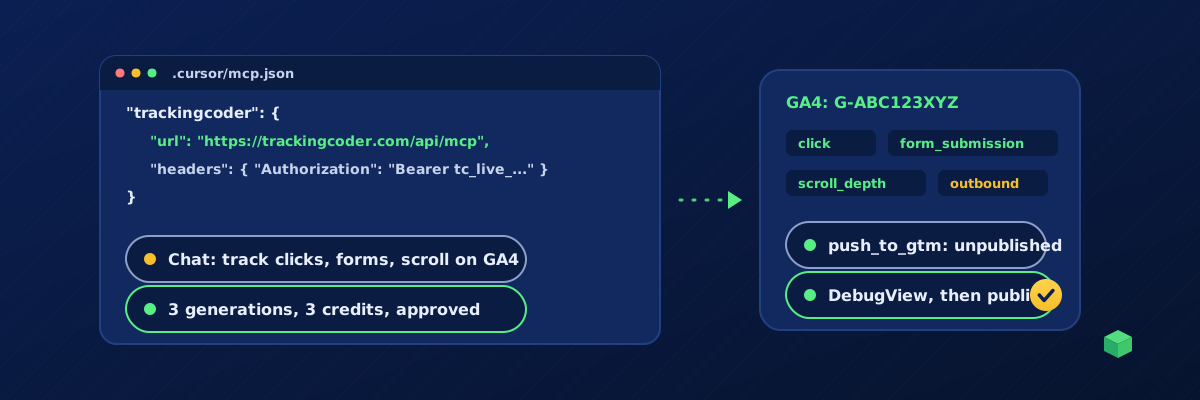
Yes, you can set up GA4 event tracking without leaving your editor. Cursor and VS Code both speak the Model Context Protocol, so one config file connects their chat to TrackingCoder's MCP server. From there the agent scans your site, proposes the GA4 events, generates the Google Tag Manager configuration for each one, pushes it into your GTM workspace and keeps the files in your repo. You verify in DebugView and publish. Here are the exact config files, the prompts and the costs.
Before you start
- A TrackingCoder account on TC Pro in a paid month; the trial does not include the API.
- An API key from Account, API keys. It starts with
tc_live_and is shown once. - Google Tag Manager installed on the site and your GA4 measurement ID (G-…).
Cursor
Create .cursor/mcp.json in the project (or ~/.cursor/mcp.json for every project):
{
  "mcpServers": {
    "trackingcoder": {
      "url": "https://trackingcoder.com/api/mcp",
      "headers": { "Authorization": "Bearer tc_live_YOUR_KEY" }
    }
  }
}
Add .cursor/mcp.json to .gitignore if the project is shared, or use the global file so the key never sits in a repo. Open Cursor Settings, MCP, and confirm the server shows six tools. Use the chat in Agent mode.
VS Code
Create .vscode/mcp.json. The input block asks for the key once and stores it in the editor's secret storage, so nothing secret is written to the file:
{
  "inputs": [
    { "type": "promptString", "id": "tc-key", "description": "TrackingCoder API key", "password": true }
  ],
  "servers": {
    "trackingcoder": {
      "type": "http",
      "url": "https://trackingcoder.com/api/mcp",
      "headers": { "Authorization": "Bearer ${input:tc-key}" }
    }
  }
}
Click Start above the server entry, paste the key when prompted, and use Copilot Chat in Agent mode. The tools appear under the tools picker.
Scan the site
Scan https://example.com with TrackingCoder and list the forms, buttons and pages worth tracking in GA4.
The agent calls scan_site (free) and reports the platform, the form plugin, phone and email links, outbound links, whether there is a cart, and a scanId valid for 24 hours.
Pick the GA4 events
Most sites want the six basic events first; shops add the e-commerce set:
| Event | GA4 event name | Typical cost |
|---|---|---|
| Button click | click (with element text) | 1 credit |
| Form submission | form_submission or generate_lead | 1 credit |
| Outbound link | outbound_click | 1 credit |
| Scroll depth | scroll_depth (25, 50, 75, 90) | 1 credit |
| Phone and email clicks | phone_click, email_click | 1 credit each |
| Purchase, add to cart, begin checkout | purchase, add_to_cart, begin_checkout | 1 credit each |
Advanced parameters (previous page, element text, scroll percentage captured on another event) are 1 extra credit each; Consent Mode v2 is 1 extra per generation. list_scenarios has every price, and the GA4 event tracking guide explains what each event is for.
Approve and generate
Generate form submission, phone click and outbound click for GA4 with G-ABC123XYZ, container format. Quote the total, and after I approve, save each container JSON under tracking/ with a README explaining how to import them.
The server requires the agent to state scenario, channel, ID and cost and wait for your approval before calling generate_tracking with confirm: true. "3 generations, 1 credit each, 3 credits, balance 10. Go ahead?" Yes. The agent writes the three files and the README. Identical requests within two minutes are returned from cache without a second charge.
Push to GTM and verify in DebugView
Push all three to the Default Workspace of GTM-ABC1234.
With Google connected once in the TrackingCoder app, the agent calls push_to_gtm for each generation after you approve the target, and the tags, triggers and variables arrive as unpublished workspace changes. No Google connection yet? Import the files instead: Admin, Import Container, choose each file, the workspace, Merge, Rename conflicting. Then open Preview and open GA4's Admin, DebugView in another tab. Submit the form, click the phone number, click an outbound link: each event should appear once in DebugView with its parameters. Then publish.
Tips for working in the editor
- Keep the containers in the repo under
tracking/. A developer picking up the project sees exactly what is in GTM and why. - Ask the agent to run
check_consenton the live site after publishing. It is free and tells you whether the new tags wait for consent. - Use
detect_trackingon a staging URL before and after a deploy to confirm the GTM snippet survived a theme change. - Once the site is monitored with TC Pro, ask "how many form submissions this week, from which sources?" and the agent answers from live data with
get_monitoring; "export the client report for last month" returns a report link. - The agent cannot publish a GTM version, buy credits or touch billing, keys, team or stored IDs. Those are in the app and in GTM.
Costs and limits
TC Pro includes 10 credits a month and 15% off packs; generation is usually 1 credit per event, and pushes, monitoring questions and reports are free. Per key, per day: 100 scans, 40 consent checks, 50 generations, 30 pushes, 20 report exports, and 60 calls a minute. Every call is logged on your account. If the subscription lapses, keys pause and resume once it is paid.
Where TrackingCoder fits
TrackingCoder is the part that knows how GA4 events should be wired for your particular site: the right trigger for your form plugin, the right selectors for your buttons, the right parameters per event. Cursor and VS Code are where you ask for it. Start free in the app with 5 credits a month; the API and MCP server are part of TC Pro.