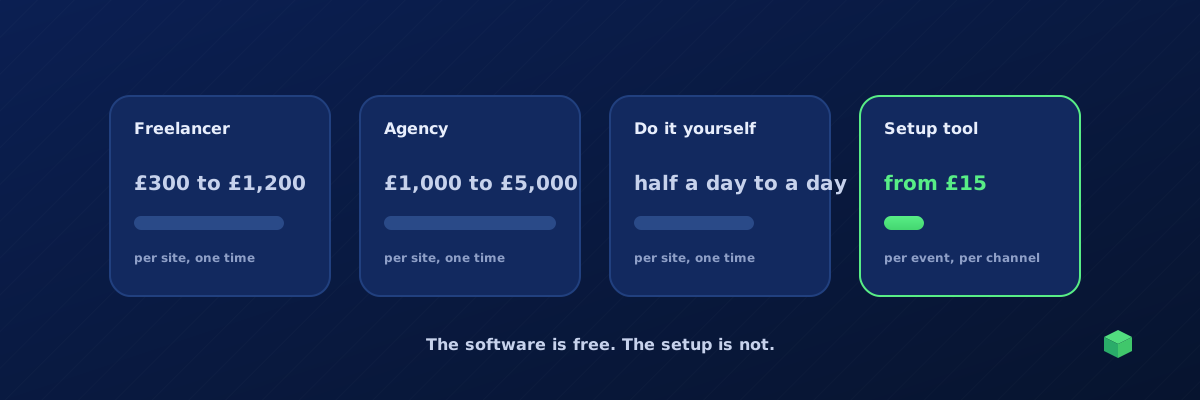
Short answer: the software is free; the setup is not. Google Tag Manager, GA4, the Meta Pixel and every ad platform's conversion tag cost nothing. What you pay for is the work of wiring them to your specific site correctly, and the work of keeping them working. That ranges from a free afternoon of your own time to several thousand pounds for an agency build. Here are the real numbers, and the cost most estimates leave out.
Option 1: a freelancer or consultant
Typical rates for GA4 and GTM work are roughly £40 to £120 an hour in the UK and $50 to $150 in the US, with specialists at the top of that range. A standard setup for one site, meaning GA4, Google Ads and Meta plus three to five conversion events, tested and published, usually takes four to ten hours. That puts a single site at around £300 to £1,200. E-commerce with full purchase tracking, add to cart and checkout events sits at the higher end or above it.
What you get: someone who has done it before and will not double-count your purchases. What you do not get: the ability to change anything yourself later without paying again.
Option 2: an agency
Agencies quote projects rather than hours. A full measurement build for an online shop, including GA4, Google Ads, Meta, Consent Mode v2, testing and documentation, commonly lands between £1,000 and £5,000. Server-side tagging, custom data layers or multi-domain setups go well beyond that. Some agencies bundle a monthly retainer for maintenance, which is worth having for the reason in the last section.
Option 3: do it yourself
The software is free, so the cost is your time. Realistic estimates for someone who has not done it before:
| Task | First time | Once you know GTM |
|---|---|---|
| Install GTM, GA4 and the pixels | 1 hour | 20 minutes |
| Form submission and button click events | 2 to 4 hours, mostly finding the right triggers | 1 hour |
| Google Ads conversion actions and Meta events | 1 to 2 hours | 30 minutes |
| E-commerce purchase tracking with value and ID | 3 to 6 hours | 1 to 2 hours |
| Testing in Preview and fixing duplicates | 1 to 2 hours | 30 minutes |
Call it half a day to a full day for a first site. The no-developer guide gives the order to do it in. The risk is not the time; it is the mistakes a first-timer cannot see, like a purchase tag that fires twice.
Option 4: a setup tool
Tools that generate the tracking for your site charge in one of three ways: a monthly subscription, a per-platform app fee, or pay per event. Per-event pricing is the cheapest way to start because you pay only for what you track. TrackingCoder, for example, charges one credit per event per channel, with packs from £15 for 5 credits, 5 free credits every month, and paid credits that never expire. A typical service site with a form, a phone click and a booking sent to GA4 and Google Ads is six credits. A comparison of the tools is in best tools to set up GA4 and Meta Pixel events.
The cost everyone forgets
Every option above prices the setup. None of them prices the breakage. Tracking fails on theme updates, plugin updates, checkout changes and consent banner changes, and it fails silently. The cost is not the fix, which is usually an hour. The cost is the weeks between the break and the fix, when Google Ads and Meta are bidding on missing or doubled conversions. For a shop spending £5,000 a month on ads, a month of broken purchase tracking is a far bigger bill than any setup fee.
So whichever option you pick, add a line for monitoring: a weekly manual check at minimum, or an alerting tool. How do you know if your tracking is broken? covers both.
A quick decision guide
- One site, standard conversions, small budget: a setup tool or DIY, plus a monthly check.
- E-commerce with meaningful ad spend: a setup tool or freelancer for the build, and monitoring with alerts. The ad spend makes breakage the expensive part.
- Many client sites: a tool that regenerates per site and a monitoring dashboard across all of them. Paying a freelancer per site does not scale.
- Custom web app, server-side needs, unusual checkout: an agency or specialist.
Where TrackingCoder fits
TrackingCoder sits in option 4. One credit per event per channel, packs from £15, 5 free credits a month with no card, and credits never expire. It scans your site and places the tags, triggers and variables in your Google Tag Manager workspace in one click, with the integration verified by Google. For the cost everyone forgets, TC Pro monitors every event on every site and alerts you the day something stops, from $13 a month at the early-adopter price with a 14-day free trial.