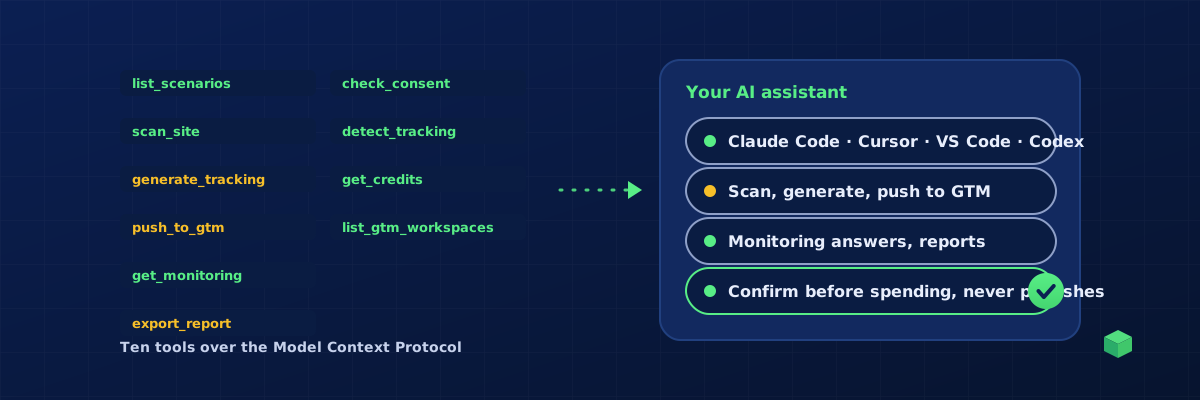
A website tracking MCP is a Model Context Protocol server that lets your AI assistant set up and manage website and ad tracking for real sites: scan them, generate the GA4 events and ad conversions, place the tags in Google Tag Manager, and read how the tracking performs. TrackingCoder runs one at trackingcoder.com/api/mcp for Claude Code, Claude Desktop, Cursor, VS Code and Codex. This guide explains what such a server does, how it differs from asking a chatbot for GTM code, what it costs, and the guardrails that make it safe to hand to an agent.
What MCP is, in one paragraph
The Model Context Protocol is an open standard that lets an AI assistant call tools on a server: the server describes what each tool does and what arguments it takes, the assistant decides when to call them, and the results flow back into the conversation. Claude Code, Claude Desktop, Cursor, VS Code's Copilot agent mode and OpenAI's Codex all speak it. A tracking MCP server is simply a server whose tools are about tracking.
What a website tracking MCP lets the assistant do
TrackingCoder's server exposes eleven tools, grouped by what they can affect:
- Read:
list_scenarios(every event, channel and credit cost),describe_scenario(the wizard's questions for an event, with hints from the scan, so the assistant asks you which form, which page, which button, what happens after submit),get_credits,list_gtm_workspaces(the GTM accounts, containers and workspaces your Google connection can edit) andget_monitoring(live counts per event and channel, conversion rates, traffic sources, goals and score for monitored sites). - Diagnose, free:
scan_site(platform, page builder, forms, e-commerce stack, installed pixels),detect_tracking(which tags a site runs) andcheck_consent(what fires before the cookie banner, and the Consent Mode v2 state). - Act, with your approval:
generate_tracking(tags, triggers and variables for one event on one channel; the only tool that spends credits),push_to_gtm(places a generation in a GTM workspace as unpublished changes) andexport_report(a branded client report or a consent report as a 24-hour link).
In practice a session reads like this: "Scan example.com and tell me what we can track." "Set up form submissions and phone clicks on GA4 G-ABC123 with Consent Mode v2." "Yes, 4 credits is fine, push both to the Production workspace of GTM-ABC1234." "How many form submissions did we get this week, and from which sources?" The MCP page has a 50-second video of exactly that.
How it differs from asking a chatbot for GTM code
| Chatbot writing GTM code | Website tracking MCP | |
|---|---|---|
| Knows your site | No; it guesses selectors and form behaviour | Scans the live site: platform, form plugin, buttons, pixels |
| Correctness | Varies with the prompt and the model | One tested engine for 450+ event and channel combinations, validated against the 2026 GTM changes |
| Gets into GTM | You paste or import by hand | Pushed into the workspace you name, unpublished |
| Knows how it performs | No | Reads live monitoring: counts, sources, goals |
| Guardrails | None | Confirmation before credits, confirmation before a push, never publishes, daily caps, every call logged |
What it will not do
Publish a GTM version (a push stops at unpublished workspace changes; you preview and press Publish), buy credits or change billing, create or revoke keys, change team or workspace settings, or read the IDs in your vault. The lines are enforced by the server, not by the assistant's good behaviour.
How to connect it
Create a key under Account, MCP & API Keys (a TC Pro feature), then add the server to your tool with the key as a bearer token. Claude Code is one command; Cursor, VS Code and Codex take one entry in their MCP config; Claude Desktop uses the mcp-remote bridge. Each has a step-by-step guide: Claude, Codex, Cursor and VS Code. Pushing to GTM also needs Google connected once in the TrackingCoder app, with the Tag Manager permission only.
What it costs
The MCP server and the API are included with TC Pro, from the first paid month; the free trial does not include them, and access stops if the subscription stops. Generation spends credits exactly as in the app: usually 1 credit per event per channel, plus 1 per advanced parameter and 1 for Consent Mode v2. Pro includes 10 credits a month and 15% off packs. Scans, consent checks, pushes, monitoring questions and reports cost nothing.
The guardrails
- Keys only work for a paying Pro subscription, checked on every call.
- Generation refuses to run without an explicit confirm flag; the server tells the assistant to quote scenario, channel, ID and cost first.
- A push also needs confirmation of the container and workspace, and never publishes.
- Per key, per day: 100 scans, 40 consent checks, 50 generations, 30 pushes, 20 reports, and 60 calls a minute.
- Every tool call is logged on your account; revoke a key and anything using it stops at once.
Where TrackingCoder fits
TrackingCoder is the tracking engine behind the server: the same scanner, the same generator and the same monitoring you get in the app, reachable from the assistant you already use. Start free in the app with 5 credits a month, add TC Pro for monitoring and the MCP server, and see the MCP page for the tour.