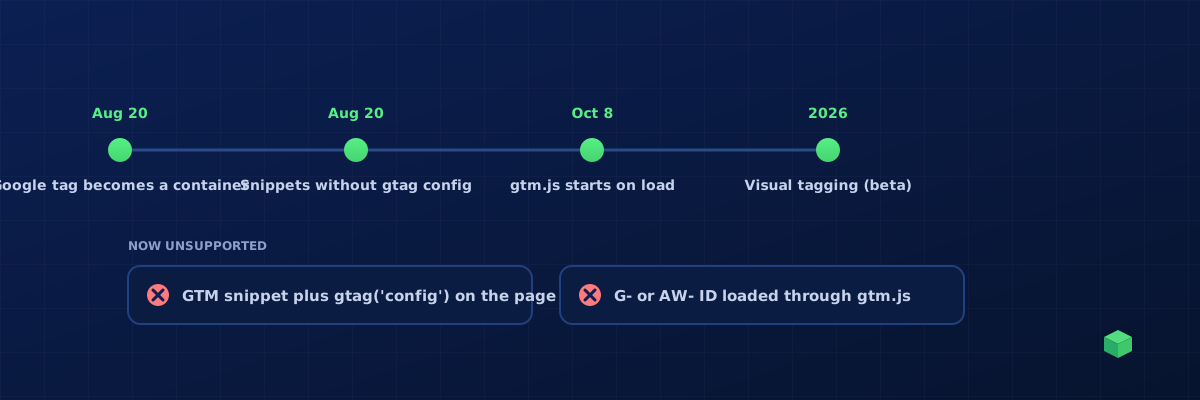
2026 is the year Google reorganised the thing most of us never wanted to think about: how the Google tag and Google Tag Manager fit together. The changes landed in stages, Google described them in a few short help-centre notes, and most of the commentary around them has been either alarmist or vague. This is the practical version: what changed, in Google's own words where possible, what can break, and a checklist you can run on your container this week.
The short version
- Google tag and Tag Manager are becoming one thing. Google tags (the G-, AW- and DC- IDs you used to install with gtag.js) are being upgraded to full Tag Manager containers. A site that only ever had a Google tag gets the GTM interface, debugging and version control.
- New snippets are identical and have no config command. Every new deployment snippet looks the same, and the
gtag('config', ...)line is gone. Initialisation is configured in the container with thegtm inittrigger. - gtm.js no longer waits for gtag('config'). Since 8 October 2026, a gtm.js container initialises when it loads, regardless of any config command on the page. Config commands show up in the dataLayer as
gtag.configevents. - Visual tagging. Define events and conversions by selecting elements on the page, with selectors and triggers generated for you. In beta, Google Ads purchase conversions first.
- Optimised containers. An optional upgrade that lets the container send data straight to Google destinations instead of loading gtag.js.
Change one: the Google tag becomes a Tag Manager container
Google's note of 20 August 2026 says Google tags "will be upgraded to fully capable Google Tag Manager containers". In practice that means a site that installed GA4 or Google Ads with a plain gtag.js snippet now sees a Tag Manager workspace behind that ID, with the Overview page reorganised into a Settings section for container-wide options and a collapsible Advanced section for triggers, variables, templates and folders. Each Google destination keeps its own tag.
Google is explicit that this "will not change the in-page behavior of the Google tags" and that existing event tags and triggers remain unchanged. Nothing happens automatically; the optimisation step is something a user with edit, approve or publish permission starts from a banner, and every change can be previewed before publishing. If you manage containers for clients, expect to see that banner in their accounts and expect questions about it.
Change two: new snippets without gtag('config')
For years the gtag.js snippet carried a config line, and a lot of setups leaned on it to pass parameters (user IDs, custom dimensions, send_page_view false) or to control when the tag initialised. The new snippets are identical across containers and omit that command. Google's recommendation is to configure initialisation with the gtm init trigger inside the container, which can also be told to wait for a config command if you want to preserve legacy behaviour.
If your pages still carry gtag('config') lines next to a GTM snippet, read the next section carefully.
Change three: gtm.js initialises regardless of gtag('config')
This is the one that can break things. Google's release note of 8 October 2026 says it is "standardizing the behavior of tagging snippets" and that "all Google Tag Manager (gtm.js) container snippets will initialize on container load, regardless of any gtag('config') commands". Two consequences follow:
- Containers that used to wait for a config command before doing anything now start immediately. Anything that depended on that delay, such as a consent default pushed just before the config call, may now run after the first tags.
- Config commands now appear in the dataLayer as
gtag.configevents. A tag on a wildcard custom-event trigger (the.*pattern) can fire one extra time per config command.
Google also names two implementations as unsupported: loading a G-, AW- or DC- ID through the gtm.js path, and pairing a GTM container snippet with a standalone gtag('config') line without the gtag.js loader. The Analytics help centre adds that pages which rely on gtag('config') to pass parameters while using a GTM snippet "must update your website code to use the correct Google tag (gtag.js) snippet", or set the Google tag up inside the container.
Change four: visual tagging
Visual tagging lets you create an event or a conversion by clicking the element on the page; Google handles the selector and the trigger. It is in beta for purchase conversions in Google Ads and Google says it will expand through the year. It is a welcome step for simple clicks, and it is worth being honest about the limits that any point-and-click tool shares: it sees one page at a time, it does not know your form plugin's success event, it cannot wire the same event to Meta, LinkedIn or Microsoft, and it does not gate anything behind consent. Treat it as a quick way to add a button click, not as a tracking plan.
What can break, and how to check
- Wildcard triggers. Search your container for custom-event triggers whose event name is
.*or similar. If a tag fires on them, add a condition that excludesgtag.config, or name the events you want. - gtag('config') next to a GTM snippet. View source on your key pages. If you see a GTM snippet and a gtag('config') line without the gtag.js loader, that setup is unsupported. Move the parameters into the Google tag inside the container, and use the
gtm inittrigger if you need the old initialisation timing. - G-, AW- or DC- IDs loaded through gtm.js. Same fix: the Google tag lives inside the container as a tag, not as the container ID.
- Consent default ordering. Because containers now initialise immediately, a consent default that used to run "early enough" may not. Run the free Website Consent Checker: it reads Google's live consent state, tells you whether the default was set late, and shows the gcs value on the first hits.
- Tag Assistant. After any change, open Preview, load the page, and confirm the Google tag initialises once, the config parameters you expect are present, and no tag fires twice.
What this means for TrackingCoder users
Nothing you generated needs to change. TrackingCoder has never put a gtag('config') command or a gtag.js loader inside a Custom HTML tag. The base Google tag is emitted as the native googtag object (only when your site does not already have one), GA4 events as gaawe tags, Google Ads conversions as awct tags, and Meta, LinkedIn and Microsoft as Custom HTML tags fed by dataLayer pushers, with consent settings on every tag when you tick Consent Mode v2. That is exactly the structure the merged Google tag and Tag Manager expect.
We did not take that on faith. For this article we generated 90 containers across 15 scenarios, 5 channels and three site types, and ran 915 checks on them: no legacy gaawc tags, no config commands or loaders in Custom HTML, every trigger and variable reference resolving, and the consent settings in the exact shape GTM imports. We then merged them and pushed every object into a sandbox container through the Tag Manager API, the same path the one-click push uses: 116 variables, triggers and tags created, none rejected. If Google changes the rules again, that harness runs again.
Where to go next
- New to containers? Start with the Google Tag Manager beginners guide.
- Consent ordering is the subtle casualty of change three; the Consent Mode v2 guide covers the default and update calls, and the consent check guide shows how to verify them on the live site.
- Broke something while cleaning up? Restoring a previous container version takes two minutes.