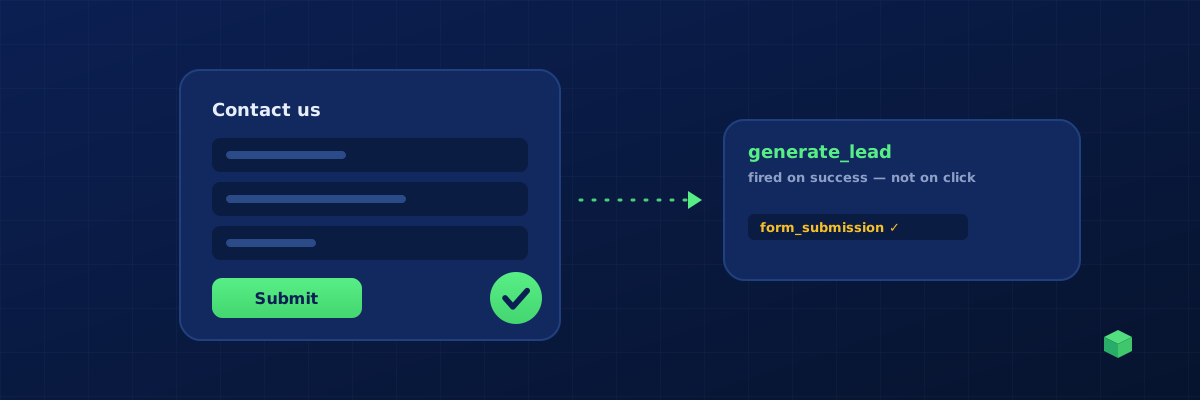
Form submission tracking is the lifeblood of B2B and lead-gen websites. It's how you measure whether your traffic is actually converting, which channels deliver the best leads, and which landing pages are working. It's also where most marketers get tracking wrong - and the consequences are silent: bad data, wasted ad spend, optimisation decisions based on noise.
This guide covers how to track form submissions properly across every common platform, why the obvious approach is the wrong one, and how to avoid the three classic pitfalls.
The #1 Mistake: Tracking the Submit Button Click
The most common form tracking implementation is to fire a GA4 event when the submit button is clicked. This is wrong for two reasons:
- It counts failed submissions. If the form has validation errors (missing email, invalid phone), the user clicks submit but the form doesn't actually submit. Your tracking still counts it as a conversion. Your reports show inflated numbers.
- It misses keyboard submissions. Users who press Enter to submit a form don't click the button. Your tracking misses them entirely.
The right approach is to fire the event on successful submission - after validation has passed and the form has actually been sent. How you detect "successful submission" depends on the form plugin.
Plugin-Specific Detection Methods
Each major form plugin signals success differently. Here's the correct method for each:
| Plugin | Detection Method |
|---|---|
| Contact Form 7 | Listen for the wpcf7mailsent event on document |
| Gravity Forms | jQuery gform_confirmation_loaded event |
| WPForms | jQuery wpformsAjaxSubmitSuccess event |
| Elementor Forms | jQuery submit_success on .elementor-form |
| Fluent Forms | fluentform_submission_success event |
| Ninja Forms | Backbone radio nfRadio.channel('forms').on('submit:response', ...) |
| Formidable Forms | frmFormComplete custom event |
| HubSpot Forms | postMessage with hsFormCallback + onFormSubmitted |
| Webflow Forms | Native submit event + watch for success div |
| Wix Forms | MutationObserver watching for the success message in the DOM |
| Squarespace Forms | Native submit event + watch for confirmation div |
| Native HTML forms | Native submit event with checkValidity() check |
Each of these uses a slightly different JavaScript pattern. Getting the right one is the difference between tracking that works and tracking that quietly fails.
The Universal Fallback Strategy
What if you don't know which plugin a form uses, or what if it's a custom form? The reliable fallback is a layered detection script:
- Listen for native
submitevents using event capture phase, and only fire ifcheckValidity()returns true - Intercept
fetch()andXMLHttpRequestcalls to detect AJAX-based form submissions - Use a MutationObserver to watch for confirmation messages appearing in the DOM (most success messages have classes like
.wpforms-confirmation,.frm_message,.confirmation, etc.)
If any of these three methods fires, you record the form submission. To prevent double-counting, debounce the event - if it fires twice within 1.5 seconds, only count it once. This catches almost every form on the web, including custom React/Vue forms.
What Parameters to Send
For each form submission, send these parameters to GA4:
- form_name - a friendly identifier like "contact_us" or "newsletter_signup"
- form_id - the actual HTML id or plugin-specific ID
- page_path - which page the form was on
- page_title - for context in reports
Avoid sending the actual form field values (name, email, phone) to GA4. It's a privacy issue and likely a violation of Google's terms of service. Use form names and IDs only.
Standard Event Names: form_submit vs generate_lead
GA4 has two recommended event names that overlap with form tracking: form_submit and generate_lead. The difference matters:
form_submit- any form submission, including newsletter signups, contact forms, comments. This is a generic engagement event.generate_lead- a form submission that represents a real sales lead. Use this for "Request a quote", "Book a demo", "Contact sales" - the forms that drive revenue. GA4 treats this as a conversion-grade event by default.
If you're running Google Ads, you almost certainly want generate_lead for your primary lead forms, because it's the event Google Ads expects for conversion bidding. For secondary forms (newsletter signups, comments), form_submit is fine.
HubSpot Forms: The Tricky Case
HubSpot embedded forms run inside an iframe, which means you can't listen to them with normal DOM events. The form itself is on hubspot.com, not your domain. To detect submissions, you need to listen for postMessage events from the iframe to the parent page. Here's the pattern:
HubSpot fires a postMessage event with type: "hsFormCallback" and eventName: "onFormSubmitted". Your tracking code listens for this on the window, then fires a GA4 event when it sees one. The form ID is included in the message data so you can track which HubSpot form was submitted.
Testing Your Form Tracking
Here's a checklist to verify form tracking is working correctly:
- Submit a valid form. Fill in all required fields correctly and submit. Check GA4 Realtime - your event should appear within 30 seconds.
- Submit an invalid form. Leave a required field empty and try to submit. The form should NOT submit, and your tracking event should NOT fire. If it does, you're tracking the click, not the submission.
- Submit by pressing Enter. Click into a text field, fill it, and press Enter instead of clicking the submit button. The event should still fire. If it doesn't, you're listening to button clicks, not form submits.
- Submit twice quickly. Some users double-click. Your tracking should debounce and only count one event. Two events from a single user submission is wrong.
Skip the Manual Setup
Picking the right detection method, writing the listener code, handling the edge cases, debouncing duplicates - this is several hours of work for someone who hasn't done it before. TrackingCoder detects which form plugin you're using during the site scan and generates the exact code for your setup. If you're using Contact Form 7, you get the wpcf7mailsent listener. If you're on Wix, you get the MutationObserver approach. If you don't know, you get the universal fallback that handles all of them.